Who is talking
I build apps like the one you just built .
Hi, I'm Jose Jose Luis Segura · calling from Luxembourg
former = I'm not here to sell you anything
1:05 · 35 s.
Hi, I'm Jose. I build apps like the one you just built. That's my job.
Key. AI Engineer and Product Builder, calling from Luxembourg. I build AI agents, automations and full apps. And I used to be a Lovable Ambassador. Key. Not anymore. So I'm not here to sell you anything.
Tonight: what this tool really is, four apps I built with it for student life, and how to get results like those. Thank you, GDG and Ekonomika, for having me.
What you used tonight
You describe it.
Idea in your head
Prompt plain English
Working app with data and login
Live link anyone can open it
1:40 · 50 s. Four quick keys for the flow, one for the company chips, one for the "vibe coding" note.
So what did you actually use tonight? One sentence: you describe it, Lovable builds it.
Keys. An idea. A prompt in plain English. A working app, with a database and login. And a live link you can send to your mum.
Key. The company: Stockholm. Founded in 2023. It grew out of an open-source project called GPT Engineer, and launched as Lovable in November 2024. Two years ago this month.
Key. And the name for what you did tonight, "vibe coding", is even younger. Two years ago the words didn't exist. An AI researcher, Andrej Karpathy, named it in February 2025. Nine months later Collins Dictionary made it Word of the Year. From nothing to the dictionary in under a year.
Paraphrase only, no verbatim quote from either.
Company-reported run-rate
From $0 to $600M a year .
2:30 · 1:00. The line draws to $100M on entry. Key 1: the Forbes sticker. Key 2: the rest of the line. Key 3: the valuation.
Now the surprising part. This is annualised revenue, the way Lovable itself reports it. Not audited. Their number.
Launch: November 2024. Zero. Eight months later: a hundred million dollars a year.
Key. That's when Forbes called it the fastest-growing software startup in history. Their words, July 2025. I'm quoting, not claiming.
Key. And then it doesn't slow down. Two hundred. Three. Four. Five. Six hundred million, announced this September.
Key. In August, investors valued the company at 13.3 billion dollars. You are business students. You know how rare that curve is.
Say "annualised revenue, according to the company". Never "$600M in revenue". Nothing above $600M. The Forbes line only as a dated quote; no comparison with other companies.
Lovable in numbers
Most builders are not engineers .
3:30 · 40 s. One key per tile (each counts up), one for the company row. One breath per tile.
Key. About eight million users, a year ago already.
Key. Seventy million projects, says Lovable. More than a million new ones every week.
Key. A billion visits a month to apps built with it.
Key. And my favourite: eighty per cent of the people building are not technical. That's you. Welcome to the majority.
Key. And people inside these companies use it too.
All company-reported. Users is dated Nov 2025: there is no official 2026 user count, don't invent one. The names are people at those companies building with it, not company-wide contracts.
Everything is already inside
You didn't install anything tonight.
4:10 · 50 s. Four keys, one per column, then one for the logo strip. One sentence per column: this slide is a map, not a list to read.
Notice something? You didn't install anything tonight. No database. No server. It's all inside.
Key · Build. Chat, plan, build. Click the page to edit it. And a time machine for when you break it.
Key · Launch. One click to publish. Your own domain. A security scan every time.
Key · Sell. Payments, with Stripe or Paddle. You'll see that in a minute.
Key · Grow. And for the marketing students: since October it even helps you advertise your app. It prepares the campaign. You approve the budget. You pay Google or Meta directly. Lovable doesn't spend your money for you. Sorry.
Key · strip. And it connects to the tools you already use. From a prompt to a business, in one place.
"Pro" tags = paid plan. Web apps, not App Store apps. Never "Lovable runs or pays for your ads". No TikTok, no LinkedIn ads, no newsletters.
Built for tonight
Four apps. One afternoon .
SplitTrip 3 prompts
first version · full version · redesign as an expense splitter
Monthly Money 1 plan + 1 fix
≈4 min to build after approving the plan
Notes Market 1 prompt + 1 click
the click: a security fix
Exam Planner 1 prompt
that's it
all four in one afternoon, mostly in parallel · all demo data is fictional
5:00 · 25 s. One key per app, quick. Last key: the hand-written line.
OK. Enough about them. What can you do with it? I built four apps for tonight. For student life.
Keys. Split a trip: three prompts. Track your money: one plan and one correction, four minutes to build. Sell your notes: one prompt, and one click. Plan your exams: one prompt.
Key. All four in one afternoon. Mostly in parallel. And everything you'll see in them is made-up data.
Let's start with the one that saves friendships.
Ever fought about who owes whom after a trip?
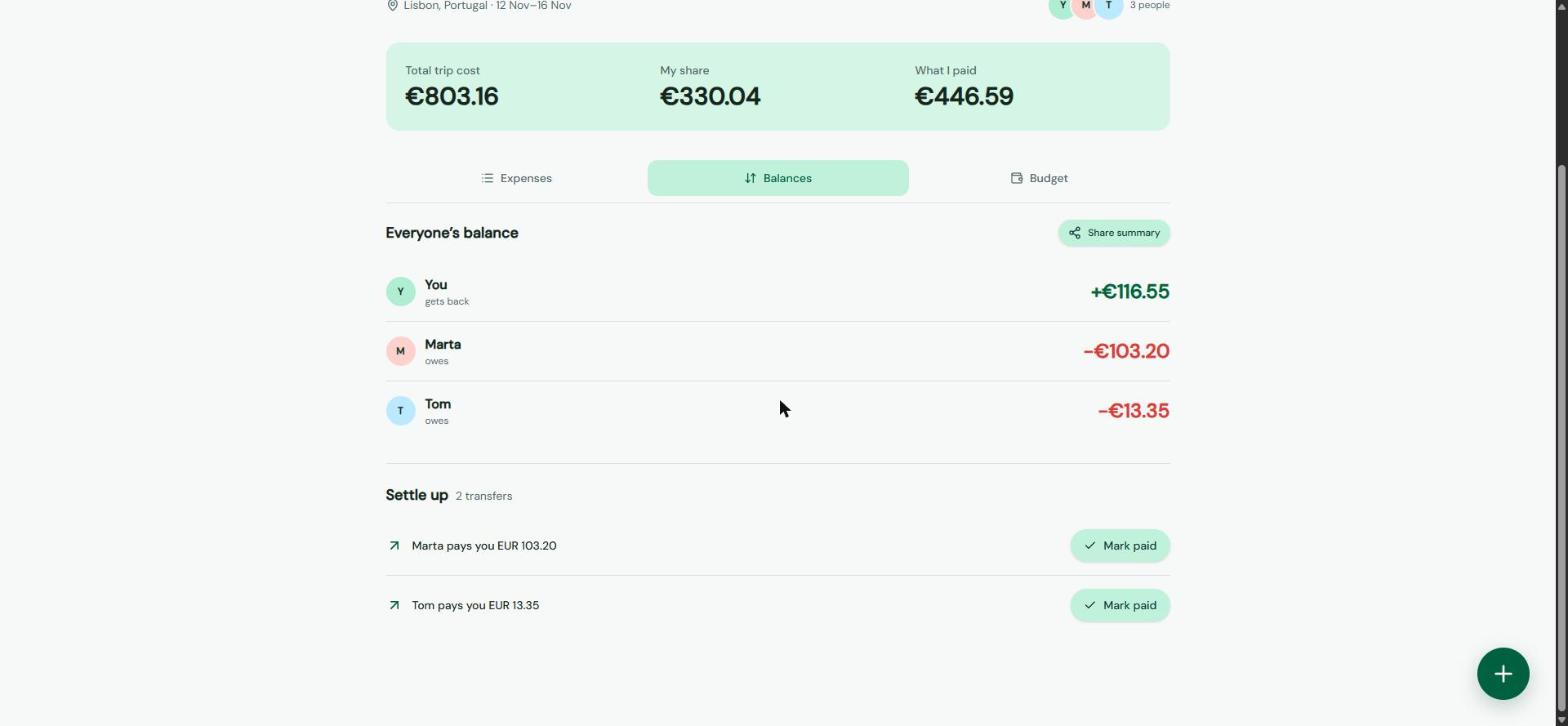
splittrip · balances
2 transfers and you're even
5:25 · 1:10 · CHAT #2. The question and the chip are there on entry. Key 1: the app appears. Key 2: spotlight on "Settle up".
Quick question. Who has had a "who owes whom" fight after a trip? Type 1 in the chat.
Pause. React to the wall of 1s: "That's a lot of ruined friendships." Yeah. Me too.
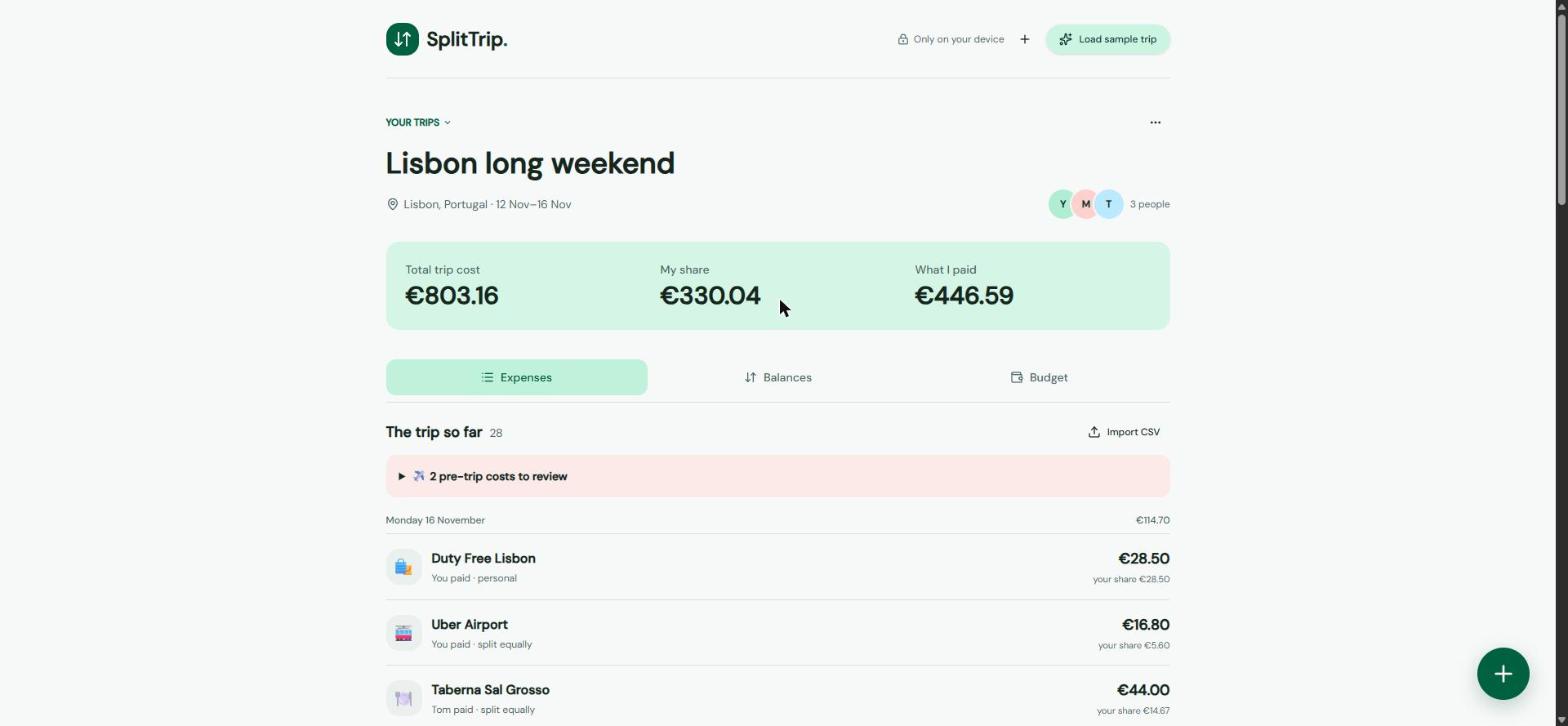
Key. So: SplitTrip. Like the expense-sharing apps you already use. But built exactly the way I want it. A sample trip: a long weekend in Lisbon. Three of us: me, Marta and Tom. Twenty-eight expenses.
The trip cost €803.16. My share: €330.04. But I paid €446.59. So people owe me money. My favourite kind of trip.
Key. Who owes whom? Marta owes €103.20. Tom owes €13.35. Two transfers and we're even. No spreadsheet. No fight.
It is a sample trip with invented names. Say "sample trip".
Marta buys gelato for everyone.
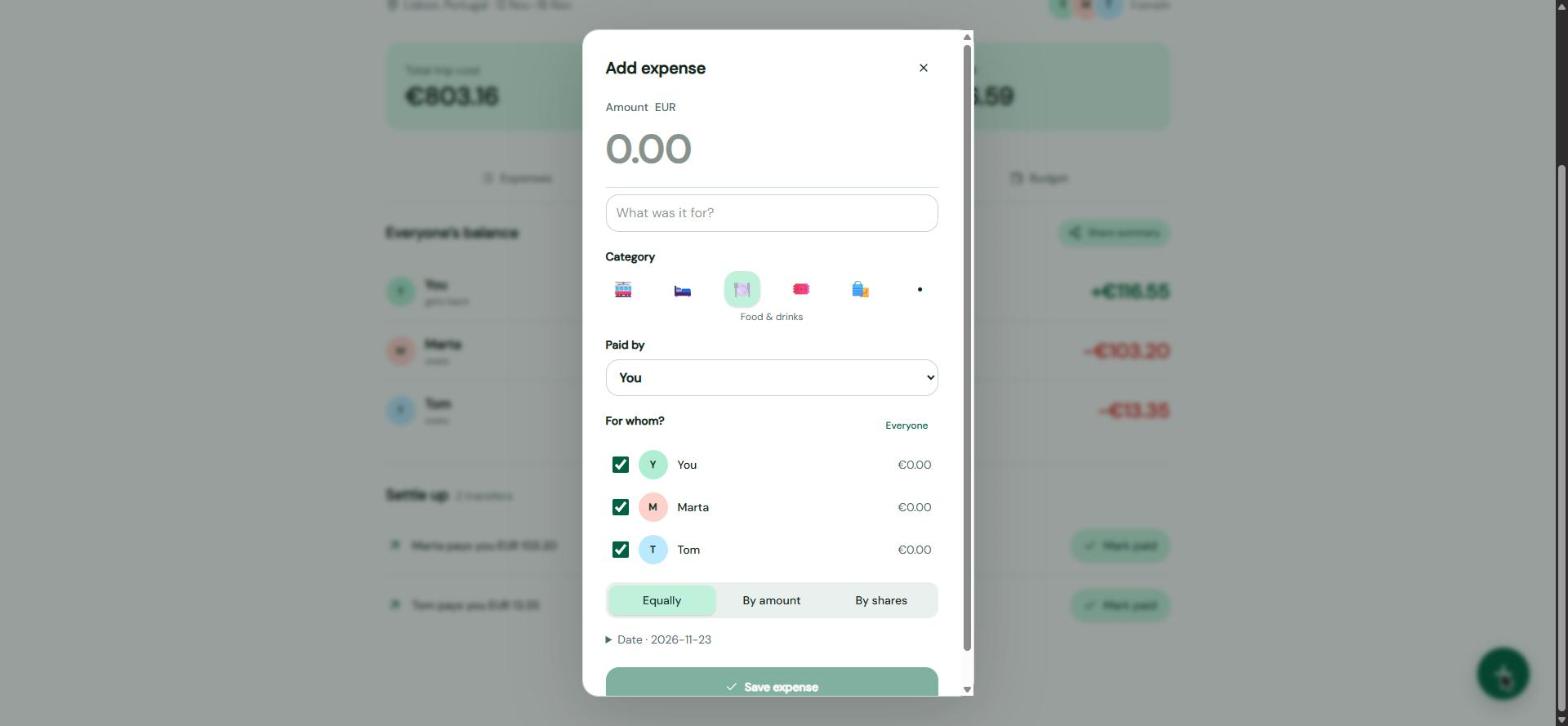
Press +
€30 · Gelato for everyonePaid by Marta · for everyone · equally
Save, then Share summary
€83.20 Marta owes · was €103.20
€23.35 Tom owes · was €13.35
€106.55 you get back · was €116.55
splittrip · add expense
Fallback screenshot
6:35 · 1:10 · LIVE. Dark stage = switch to the browser tab with SplitTrip (sample trip freshly reloaded, no rehearsal gelato).
Let's break it. Say Marta buys gelato for everyone. Hypothetically. Marta never pays.
+ → €30 → "Gelato for everyone" → paid by Marta → everyone, equally → Save.
Look at the balances. Marta now owes €83.20. Tom owes €23.35. Instantly. Ten euros each.
Share summary. And this goes to the group chat. Passive-aggressive message included, free of charge.
If the demo fails: stay here, press the key, the three results appear. Same words.
Optional, only if you are ahead of time and have tested the prompts in demo-runbook.md: ask the chat "A: multi-currency or B: receipt photo?", paste the winner in Build mode, check it at the end. Not on a slide.
A money app.
Lovable → mode: Plan
Paste the prompt
Read the plan. What's wrong for my life?
Correct it, then Approve
≈4 minutes to build. Meanwhile: let's make money.
monthly money
What we are about to build
7:45 · 1:30 · LIVE. Browser → Lovable dashboard → Plan mode. Prompts in demo-runbook.md → Demo 2.
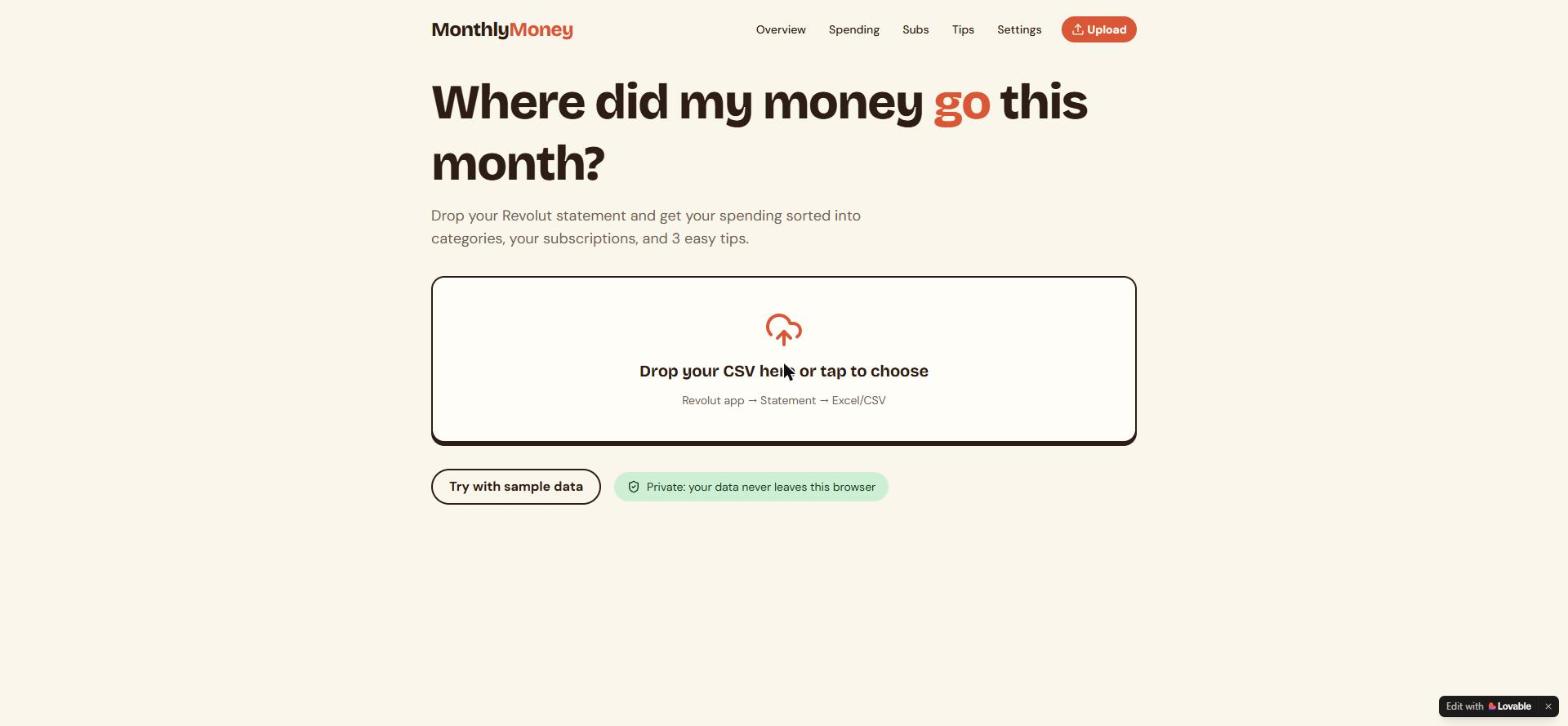
Second app. This one I build from zero, live. What could go wrong. It reads the CSV file you export from your bank and tells you where your money went. I use a Revolut export. Belfius has one too. Check your own bank's app.
Paste the plan prompt. While it plans: No technical words. Who it's for: students. What I want to see. One rule: no login, my data stays in my browser.
The plan appears. Read two lines aloud. Look for what is wrong for your life. Same rent problem as in rehearsal? Point at it. If not: "This time it got it right. But this is exactly what I'd check."
Paste the correction (count transfers as expenses, Belgian shops). Approve.
Key. The build takes about four minutes. So while it cooks, let's talk about money going the other way: into your pocket.
App 3 · Notes Market
Sell your exam summaries.
Built with 1 prompt + a one-click security fix
like Stuvia, but yours
Test mode
the preview · card 4242 4242 4242 4242 · no real money
Live is a decision
privacy policy, terms, refund policy + verification. Then real money moves.
only sell what's yours: your summaries, never the lecturer's slides
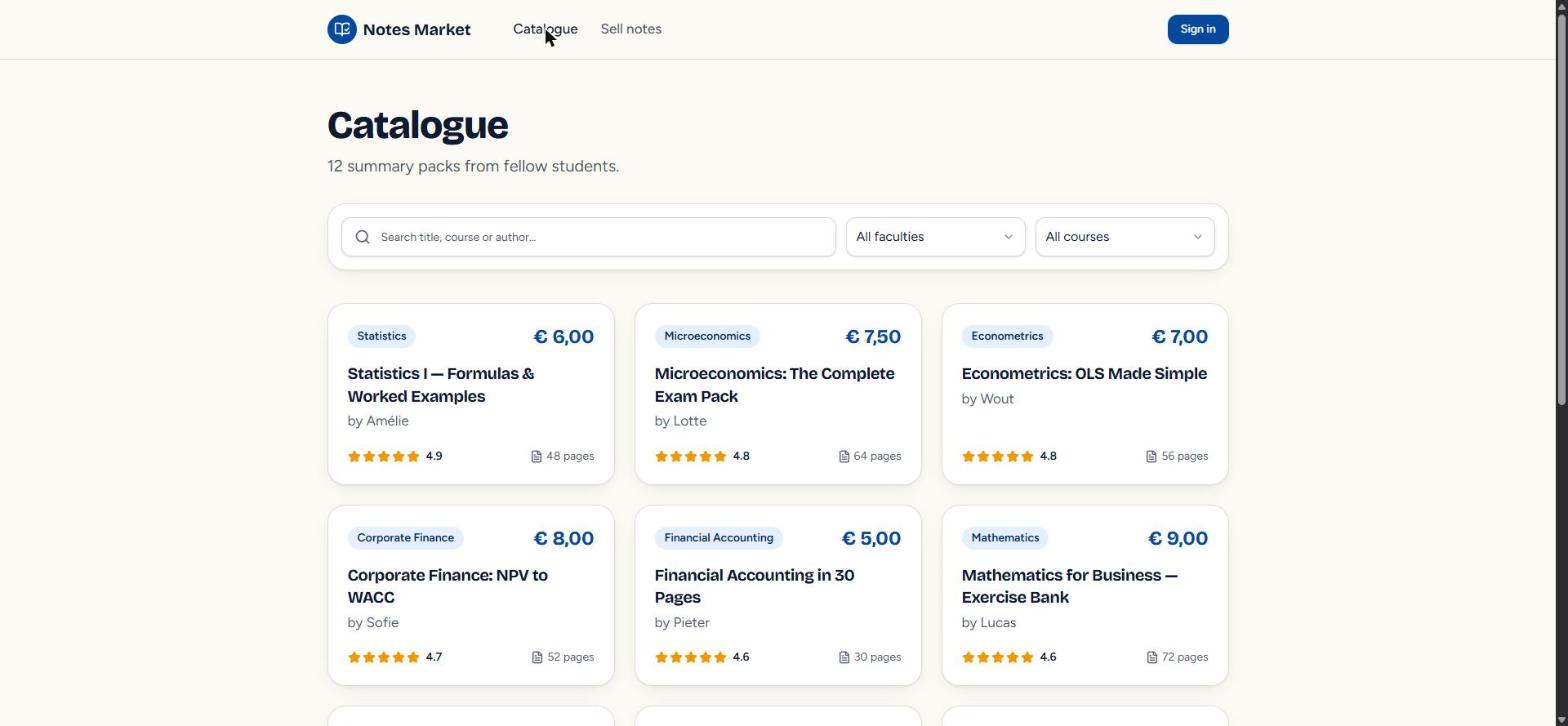
notes market · catalogue
real money is a few prompts away
9:15 · 1:30. Key 1: spotlight on a price. Key 2: test mode (then, optional, the live purchase in the browser). Key 3: live. Key 4: the honest line.
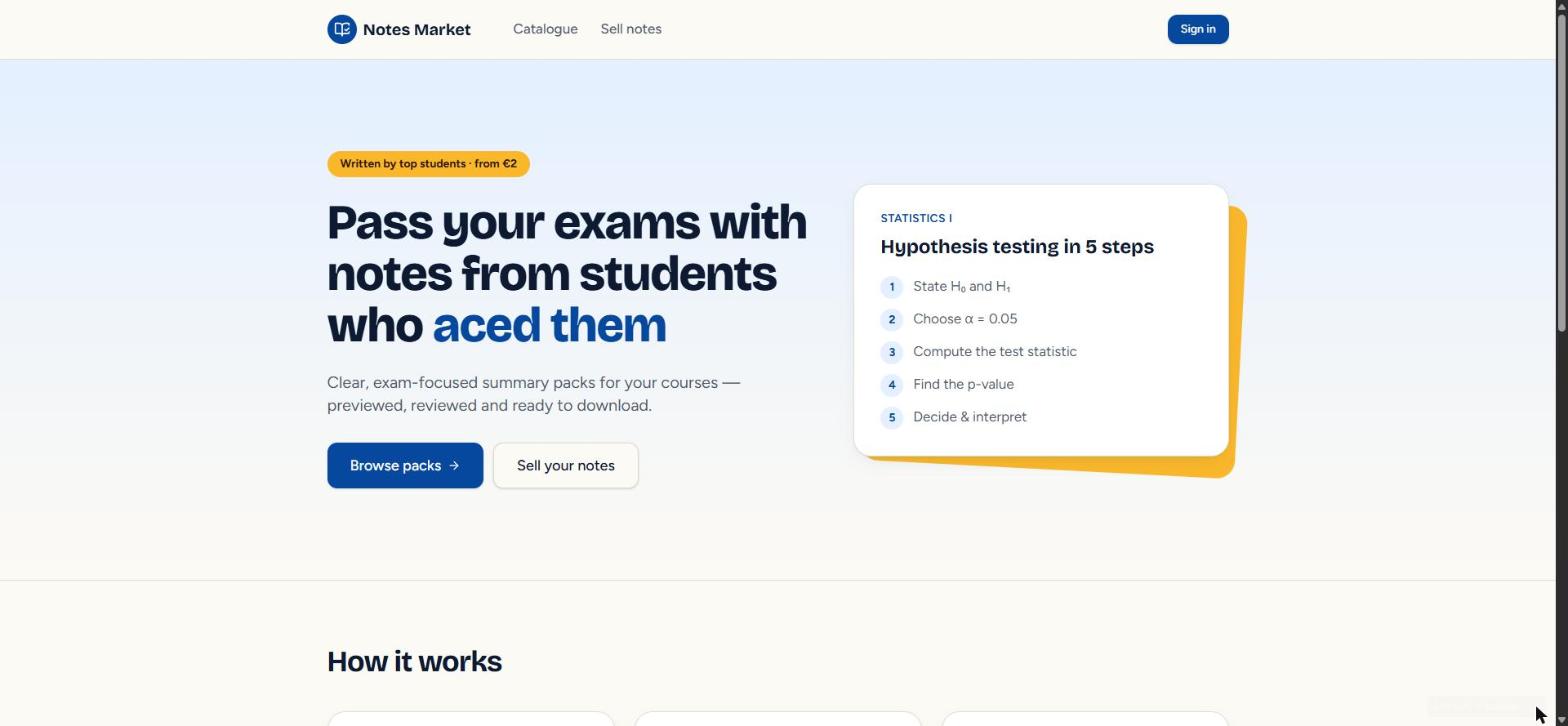
You write great summaries before exams. Other students would pay for them. You already know Stuvia. You could build one just for your faculty, or your student association. So: Notes Market. A shop for summary packs. Fictional authors, fictional packs, sadly.
Key. Six euros a pack. Real money is a few prompts away.
Key. I open a pack. Buy. This is a real checkout, built into Lovable, here with Stripe. Right now in test mode: the test card, 4242 four times, any future date, any three digits. (Optional live: pay → library → download.) Paid. It's in my library.
Key. Test mode is a toy. Live is a decision. Lovable asks for a privacy policy, terms and a refund policy. There's a verification step. Then real money moves. Real customers. Real refunds. Welcome to business.
Key. One honest thing: only sell what's yours. Your own summaries. Never the lecturer's slides: those are not yours to sell. And check your university's rules before you become the summary mafia.
If payments are not enabled or the checkout fails: stay on the slide (saves ~30 s). Built-in payments need the Pro plan.
App 4 · Exam Planner
Exams start 11 January . Six weeks.
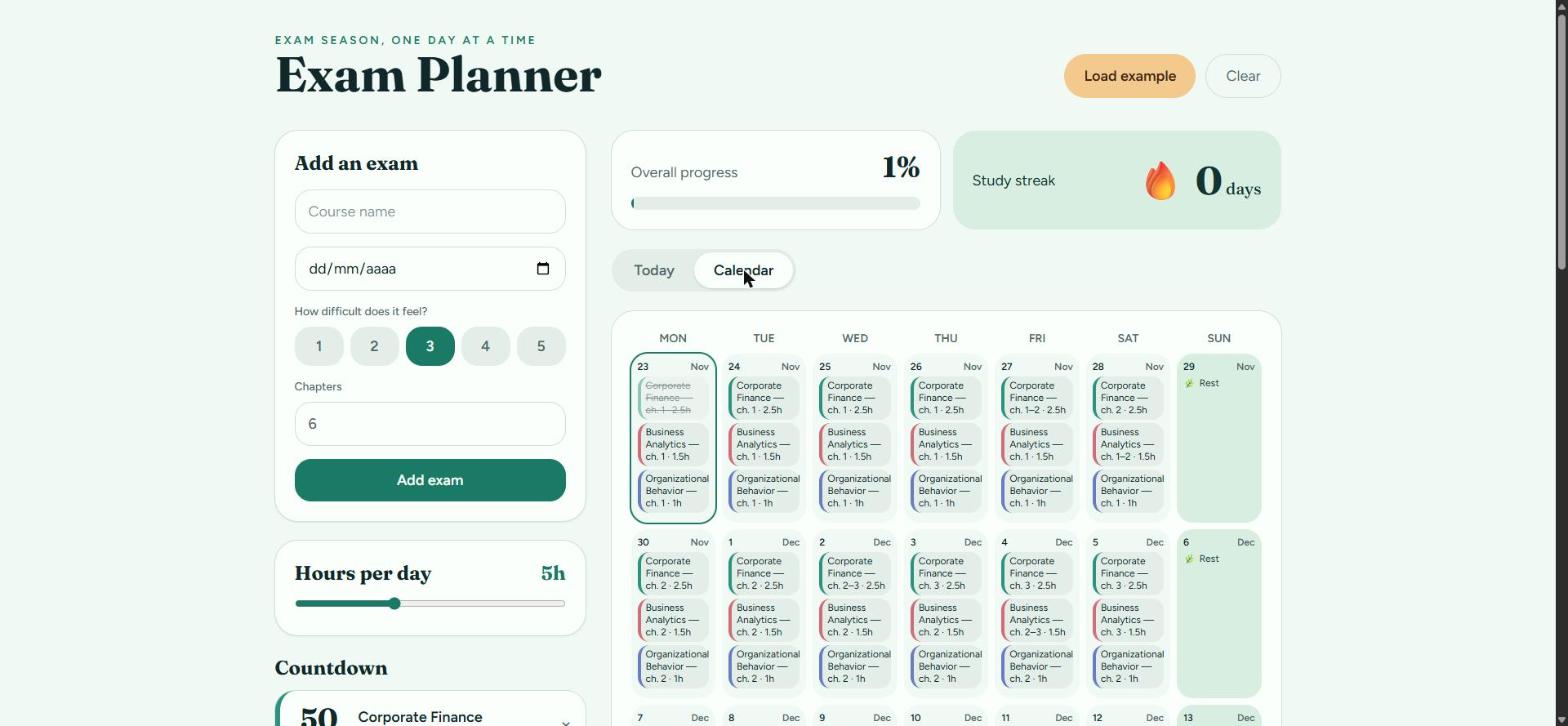
exam planner · today
exam planner · calendar
every day planned, rest days included
10:45 · 1:15. Stay on the slide (or 20 s in the browser: Load example → Today → Calendar). Key 1: today's list. Key 2: spotlight on the calendar.
Exams start on the eleventh of January. That's six weeks from tonight. Sorry.
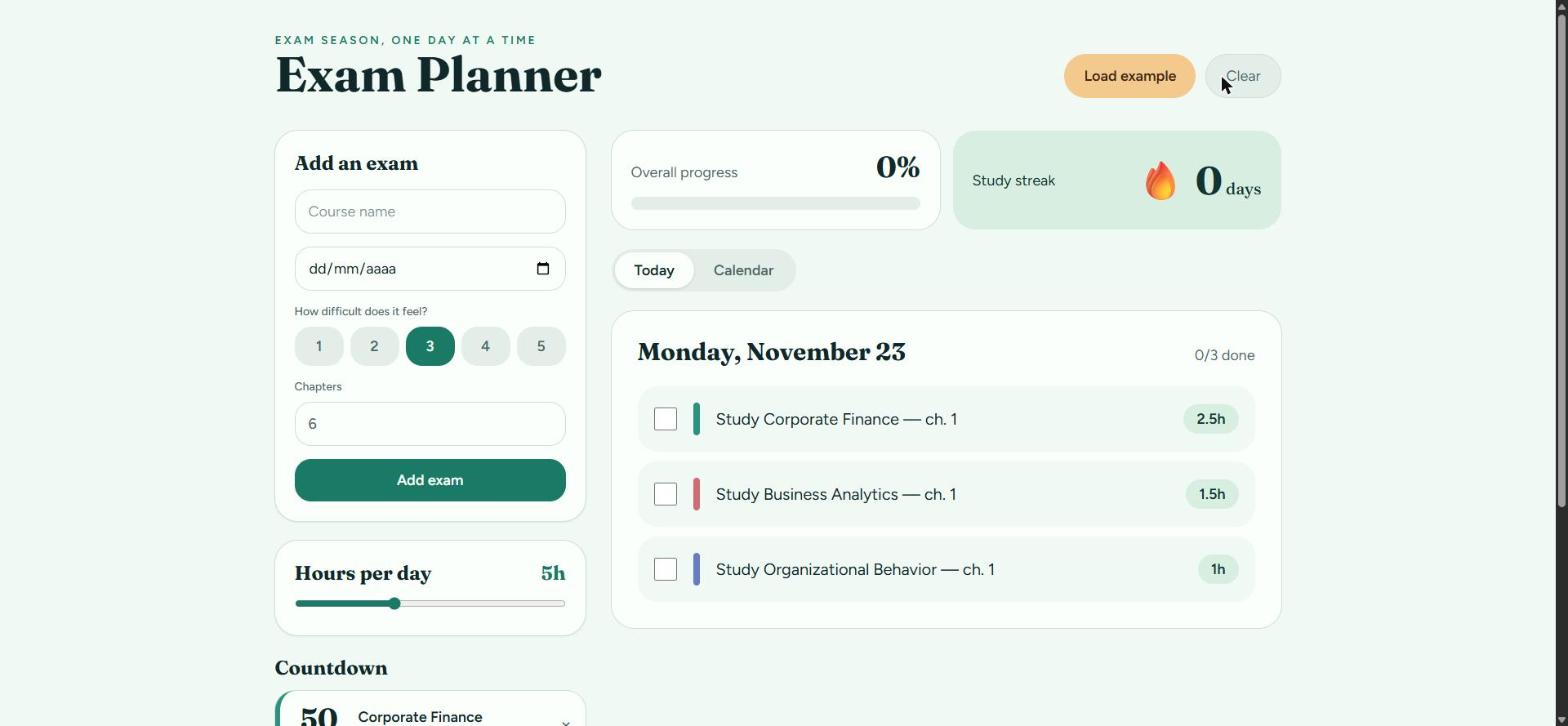
So this is the app you might actually open tomorrow morning. You add your exams. How hard each one feels. How many hours a day you have.
Key. And every morning it tells you exactly what to study today. Three blocks. Tick them off.
Key. And the whole plan until the exam, day by day. Rest days included. One prompt.
It will not study for you. I asked.
Now think bigger: the same planner for your study group, or for everyone in your programme.
Right. Is our money app ready?
Date source: KU Leuven first-semester exams 11–30 Jan 2027, preparation week 4–10 Jan, per KU Leuven exchange factsheets. Check the official academic calendar before the talk; if unsure say "in about six weeks". The screenshots show example data.
One month.
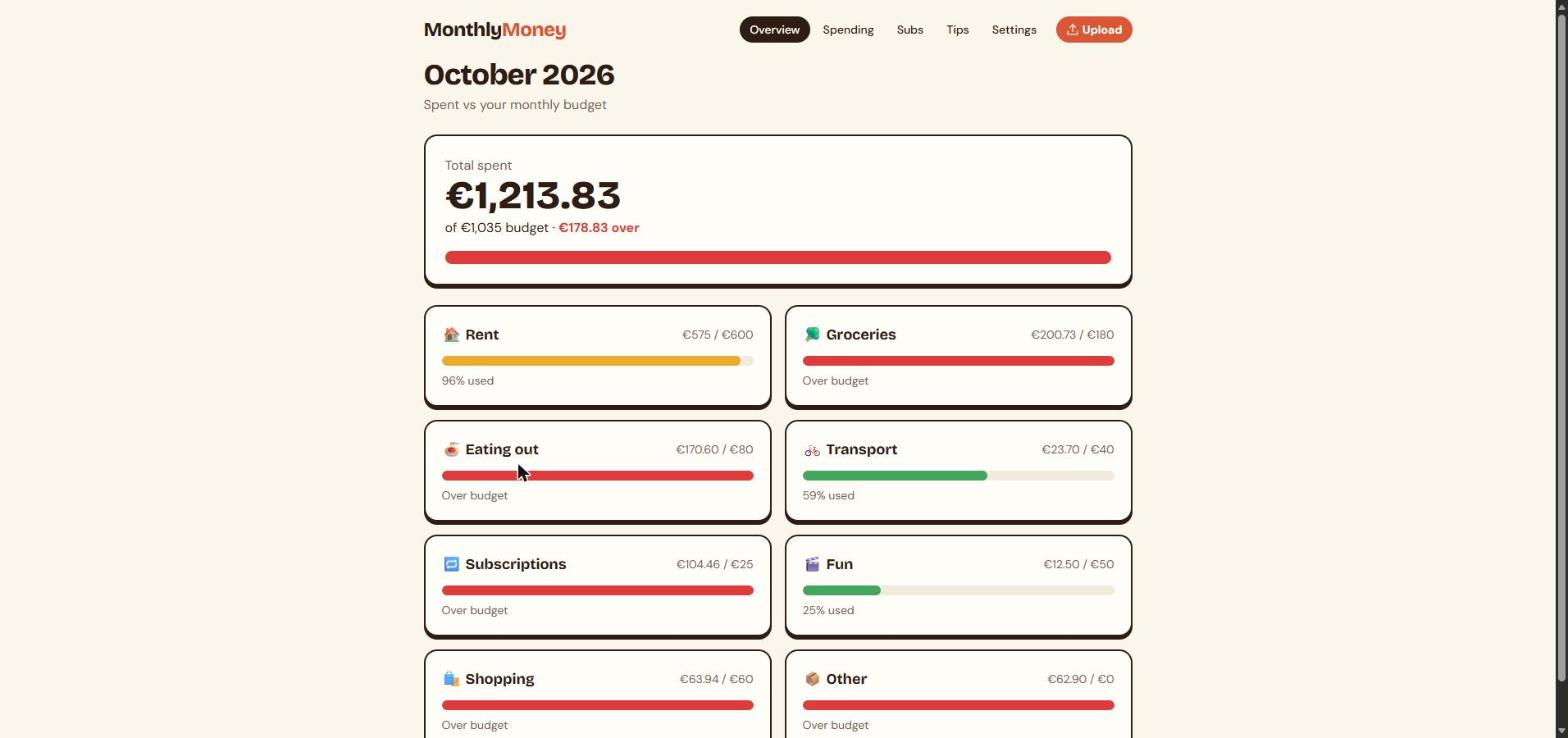
Upload the bank's CSV exportBelfius and others 35 expenses · €1,213.83Budget €1,035 → €178.83 over
Rent: €575. It's there.
not ready? "this is why I bring a backup"
monthly money · overview
Fallback screenshot
12:00 · 1:15 · LIVE. Browser → the Monthly Money project you just built. Not ready or broken? "This is why I bring a backup" → the prebuilt Monthly Money Map, or stay here and press the keys. Do NOT open the Subscriptions tab yet: the next slide asks the chat to guess first.
Let's go back. Is our app ready? Upload the October CSV (demo-data/revolut-demo-october-month.csv).
One month. October. A made-up student in Leuven. This file is a Revolut export, but any bank that gives you a CSV works. Thirty-five expenses. €1,213.83. The budget was €1,035. So: €178.83 over. Relatable.
Scroll the categories. Let them look for three seconds. Eating out: more than double the budget. Groceries: over. Transport: fine.
And look. The rent is there. €575 for a kot. The correction to the plan saved it. Hold that thought.
Now, one tab I haven't opened yet. Back to the slides.
Fictional demo data
What does my demo student pay a year for subscriptions?
€1,253.52
a year · 6 subscriptions · my made-up demo student
Basic-Fit €359.88
ChatGPT Plus €276.00
Proximus Mobile €180.00
Netflix €161.88
Spotify €143.88
Disney Plus €131.88
Total €1,253.52 / year
Monthly Money demo app · sample statement, October 2026 · invented student, invented amounts
13:15 · 1:25 · CHAT #3. On entry: only the question. Let the guesses come in for 15 seconds. Key 1: the number counts up and the six bars grow.
Before I open the last tab, a guess. How much does a student pay a year for subscriptions? Music, series, the gym, the phone. Type a number in the chat.
Read three or four aloud: "Two hundred. Four hundred. Someone says a thousand: we have a pessimist."
Key. My demo student, and I made her up for tonight: €1,253.52 a year. Six subscriptions.
None of them looks scary. Ten euros. Fifteen. Twenty-three. Monthly prices are designed to look small. The gym alone: €359.88. For a gym she visited… let's not ask.
Who was close? Most people guess low.
And the app gives three tips for next month. Tip three: cancel or share the gym. Built in about four minutes. From a plain bank export. Your own data, your own question, your own app.
Always "made-up demo student". Never present the number as a real statistic about students.
Tip 1 · Plan mode first
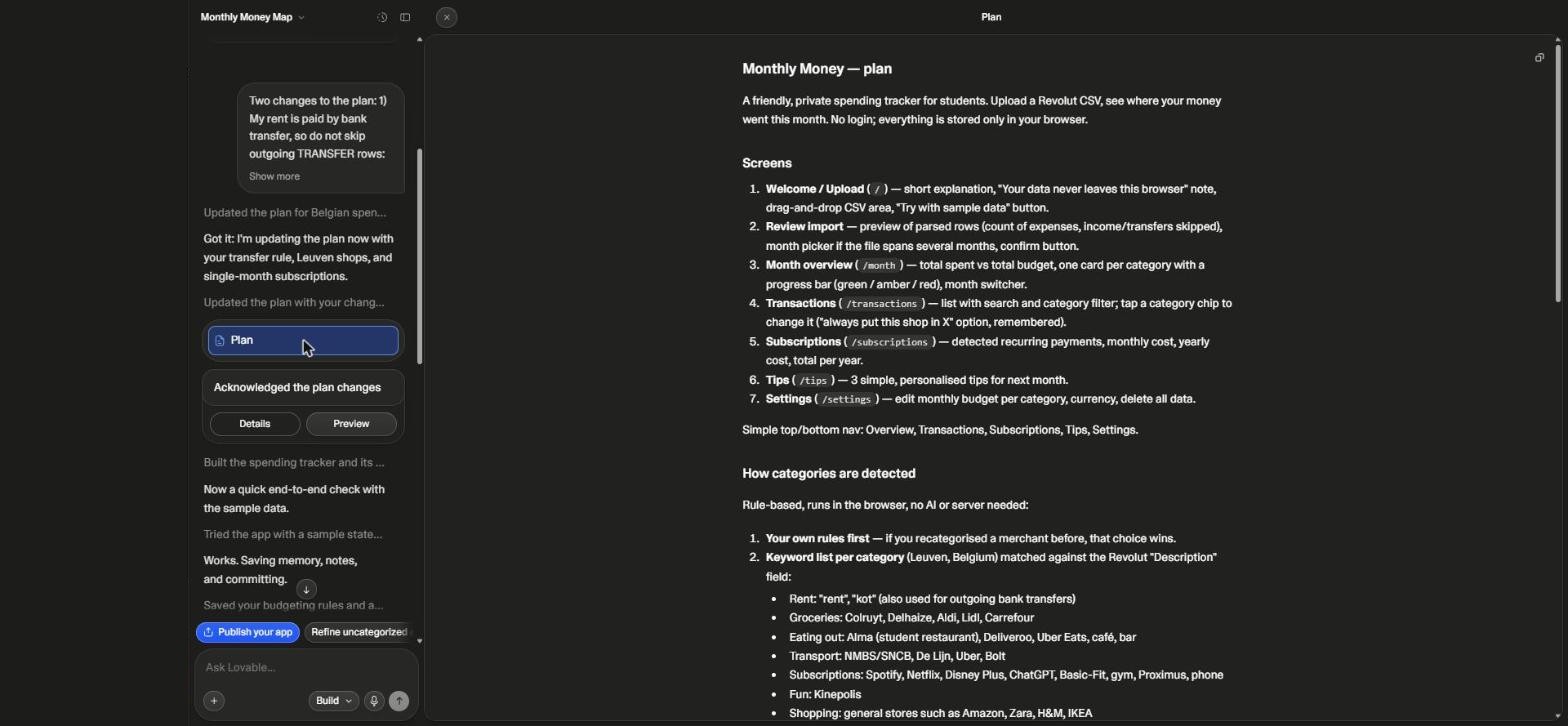
The first plan forgot my rent .
It said: skip bank transfers. I pay my rent by bank transfer.
lovable · plan mode
fixed here, in the planbefore building anything
14:40 · 1:00. Slow down: this is the lesson of the night. Key 1: what the plan said. Key 2: the three steps. Key 3: spotlight.
Now, a confession. When I prepared this talk, the first plan for that app forgot my rent.
Key. It said: skip bank transfers. But I pay my rent by bank transfer. So my biggest expense would have disappeared. Silently. And the app would have told me I'm rich.
Key. So, the most useful tip of tonight: Plan mode first. Lovable proposes a plan. You read it. And you correct it, before a single credit goes into building the wrong thing.
Key. This is the corrected plan. Rent: detected, also for outgoing bank transfers. Reading a plan takes one minute. Rebuilding an app takes an evening.
Tip 2 · anatomy of a good prompt
The exact prompt I pasted. Five parts.
I want an app called "Monthly Money" to understand my personal spending each month. I upload the CSV statement I export from Revolut, and the app sorts every expense into categories (rent, groceries, eating out, transport, subscriptions, fun, shopping), shows how much I spent vs my monthly budget per category, finds my recurring subscriptions and how much they cost per year, and gives me 3 simple tips to save money next month. It is for students, so keep it simple, friendly and private: no login, data stays in my browser. Before building, propose the plan: screens, how categories are detected, and the order to build it.
Who it's for
Your data
The task
The rules
What you want back
Say WHY, not just what.
“My rent is paid by bank transfer, so count transfers as expenses.”
15:40 · 1:20. Five keys, one per part, one sentence each. Don't read the prompt. Key 6: Say WHY.
This is the exact prompt you saw me paste. It has five parts.
Key. Who it's for: students. Key. My data: the CSV I export from Revolut. Key. The task: sort, compare with my budget, find subscriptions, three tips. Key. The rules: simple, private, no login. Key. And what I want back: a plan first.
Be explicit. What you don't ask for won't appear. Not sure what to say? Ask it: "Before building, ask me the questions you need."
Key. And the big one: say why, not just what. "My rent is paid by bank transfer, so count transfers as expenses." I gave it the reason. So it applies the rule with judgement. That's how the rent was saved. It works on people too, by the way.
If late: "five parts", then straight to key 6.
Your turn · tonight · 10 minutes
What will you build next? Start here.
For your thesis, a case competition, your student association. Or the prototype you show in an interview.
Export your bank's CSV Belfius … Open Plan mode. Paste this prompt. Fix the plan for your life.
your data stays in your browser.
Starter prompt · Plan mode I'm a student and I want an app called "My Money" to see where my money goes each month. I upload the CSV I export from my bank. Sort every expense into categories, show what I spent vs my budget, find my subscriptions and what they cost per year, and give me 3 tips to save. Keep it simple and private: no login, my data stays in my browser. Before building, propose the plan.
17:50 · 1:00. Three keys for the steps, one for the privacy line. Never cut this slide.
So. You've seen four apps, and you have the tool open. What will you build next? If you don't know yet, start here. Homework. Tonight. Ten minutes. Find your own number.
Key. One: export your own bank statement as a CSV. Revolut does it, Belfius does it, check your bank's app. Key. Two: open Plan mode and paste this prompt. Same anatomy: who, your data, the task, the rules, the plan. Key. Three: fix the plan for your life. And when you correct it, explain why. Like I did with the rent.
Key. Your data stays in your browser. Never paste your statement into the chat.
Then tell me your number. If it's above €1,253, the first coffee is on you.
And don't stop at money. Use this for your thesis tools. For a case competition. For your student association. Or for the prototype you show in an interview: nobody else in that room will have built one.
Appendix · what does it cost?
Free to start. $25 when you're serious.
5 build credits a day, up to 30 a month
Database, login and storage included
No custom domain
100 credits + the 5 daily ones; unused credits roll over
Custom domain, built-in payments
Students: 50% off Pro, up to 12 months
“make the button gray” ≈ 0.5 credit
“add authentication” ≈ 1.2
landing page with images ≈ 2
a Plan mode message = 1
docs.lovable.dev · subscription plans, plans and credits · read Nov 2026 · prices change, check before you buy
Appendix, for "how much does it cost?"
There's a free plan: five credits a day, up to thirty a month. Pro is 25 dollars a month for a hundred credits, plus the daily ones, and unused credits roll over. Students get half off Pro.
Small edits cost less than a credit; a Plan mode message costs one. My own rough guess, not official: a new app plus a few changes is five to ten credits. So on the free plan, one day is about one app and a couple of tweaks.
Appendix · when the AI gets stuck
It will break. Four moves.
Read the error paste it back, ask what it means
Go back to the last version that worked
One change at a time, so you know what broke it
New approach Plan mode: explain the problem first
Appendix, for "what happens when it breaks?"
It will break. Four moves. Read the error and ask what it means. Go back to the last version that worked. Change one thing at a time, so you know what broke it. And if "Try to fix" goes round in circles, change the approach: switch to Plan mode and ask it to explain the problem before fixing it.




 What you used tonight